LXC 容器使用 CIFS 作为 rootdir 存储问题解决#
问题#
正常启动容器出错,显示: Connection failed (Error 596: Connection timed out) 错误,并在任务日志中查看有如下错误:
run_buffer: 322 Script exited with status 255
lxc_init: 844 Failed to run lxc.hook.pre-start for container "121"
__lxc_start: 2027 Failed to initialize container "121"
TASK ERROR: startup for container '121' failed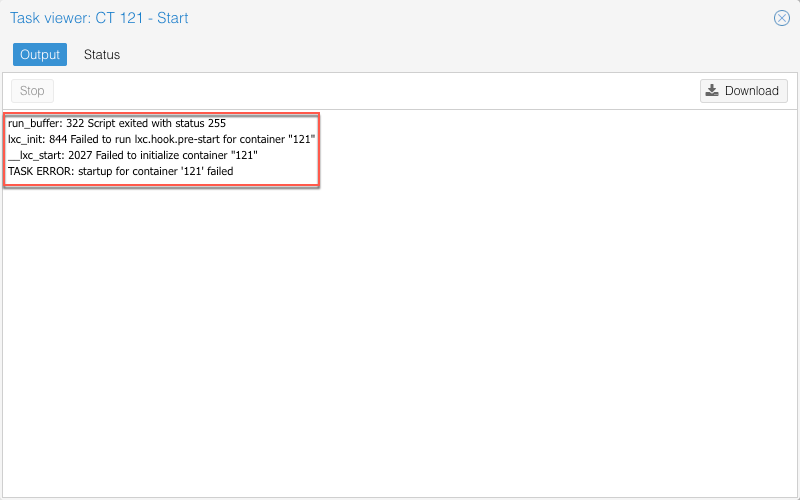
解决#
以调试模式运行容器,并分析输出日志
pct start 命令
pct start CTID --debug或 lxc-start 命令
lxc-start -n CTID -F -l DEBUG -o /tmp/lxc-CTID.log其中 CTID 为容器 ID
从日志中发现错误的原因可能是下面这行:
mount: /var/lib/lxc/.pve-staged-mounts/rootfs: can't read superblock on /dev/loop0.
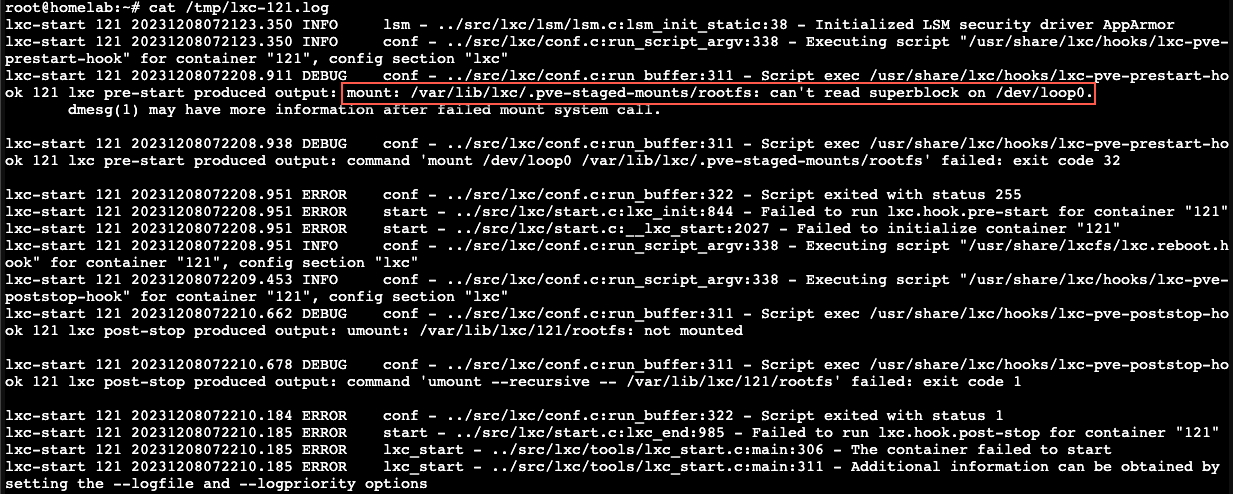
经过搜索,发现已经有类似的问题出现,这个问题产生的主要原因在于容器的 rootdir 采用了 CIFS 存储介质,进而导致无法读取 CIFS 存储上容器的 Superblock 。
- PVE LXC Container won’t boot up
- Superblock for container on CIFS storage cannot be read after each unmount
- LXC containers with CIFS Share as Disk Drive Not booting
解决方案也比较简单,只需执行 pct fsck CTID 这一条命令即可。
pct fsck 121
如无意外,现在应该能正常启动容器。
TurnKey FileServer 修复 Apache2 运行问题#
Apache2: Failed to set up mount namespacing: Permission denied
sudo sed -i -e 's,PrivateTmp=true,PrivateTmp=false\nNoNewPrivileges=yes,g' /lib/systemd/system/apache2.service
sudo systemctl daemon-reload
sudo systemctl start apache2.service
sudo systemctl status apache2.service